Ripple Runtime: Compilation Pipeline
Part 2 of the Ripple internals deep dive series.
Phase 1: Compilation - From Ripple to JavaScript
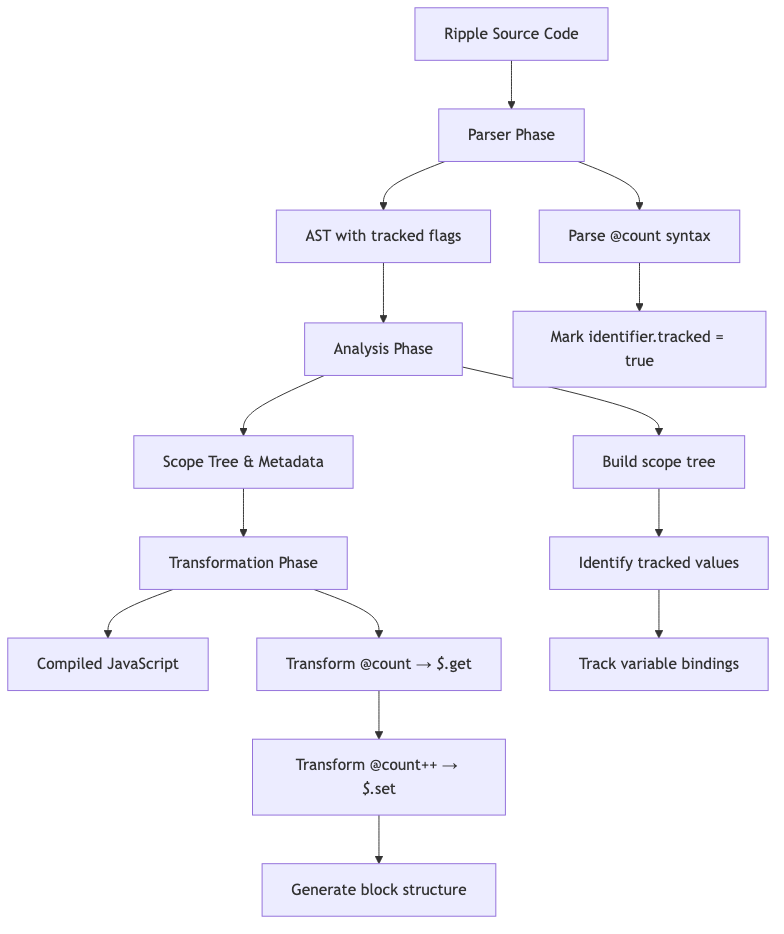
Before our component can run, Ripple's compiler transforms it into optimized JavaScript. The compilation process happens in three phases: parsing, analysis, and transformation. Understanding this transformation is crucial because it shows how reactive syntax becomes runtime calls that enable dependency tracking.
Step 1.1: Parser Transformation
The parser reads our Ripple syntax and builds an Abstract Syntax Tree (AST). The key transformation is how @count is handled.
Original Ripple code:
let count = track(0);
let double = track(() => @count * 2);
What the parser sees:
@countis a special token (not a regular identifier)- The parser strips the
@and marks the identifier astracked: true
AST Structure:
// First variable declaration
VariableDeclaration {
  declarations: [{
    id: Identifier { name: "count" },
    init: CallExpression {
      callee: Identifier { name: "track" },
      arguments: [Literal { value: 0 }]
    }
  }]
}

// Second variable declaration (note the tracked flag!)
VariableDeclaration {
  declarations: [{
    id: Identifier { name: "double" },
    init: CallExpression {
      callee: Identifier { name: "track" },
      arguments: [ArrowFunctionExpression {
        body: BinaryExpression {
          operator: "*",
          left: Identifier {
            name: "count",
            tracked: true  // ← This flag is crucial!
          },
          right: Literal { value: 2 }
        }
      }]
    }
  }]
}
The tracked: true flag is crucial - it tells the transformer that this identifier needs runtime dependency tracking. Without this flag, the transformer wouldn't know to generate the special _$_.get() call that registers dependencies.
Step 1.2: Analysis Phase
The analyzer walks the AST and builds a scope tree - a map of all variables and where they're used. This helps the transformer generate correct code.
Scope Analysis:
ComponentScope {
  declarations: {
    "count": Binding {
      node: Identifier,
      initial: CallExpression { callee: "track" },
      kind: "let",
      metadata: {
        is_tracked: true  // ← This is a tracked value
      }
    },
    "double": Binding {
      node: Identifier,
      initial: CallExpression {
        callee: "track",
        arguments: [Function]  // ← Function means it's derived
      },
      kind: "let",
      metadata: {
        is_tracked: true,
        is_derived: true  // ← Computed from other values
      }
    },
    "showDouble": Binding {
      node: Identifier,
      initial: CallExpression { callee: "track" },
      kind: "let",
      metadata: { is_tracked: true }
    }
  }
}
What this tells us:
countis a simple tracked value (stores a number)doubleis a derived value (computed fromcount)showDoubleis a simple tracked value (stores a boolean)
The analyzer also tracks where each variable is referenced, which helps with optimization.
Step 1.3: Transformation Phase
The transformer generates optimized JavaScript code. This is where the magic happens - reactive syntax becomes runtime calls.
Transformed Component (simplified):
import * as _$_ from 'ripple/internal/client';
import { track } from 'ripple';

function Counter(props) {
  // Create component context (tracks component state)
  const component_ctx = _$_.create_component_ctx();
  _$_.push_component();

  // Tracked value creation
  // Note: component_ctx is passed as 4th argument
  let count = track(0, undefined, undefined, component_ctx);
  let double = track(() => _$_.get(count) * 2, undefined, undefined, component_ctx);
  let showDouble = track(true, undefined, undefined, component_ctx);

  // Root block - wraps entire component rendering
  return _$_.root(() => {
    // Template creation (HTML string → DOM)
    const __anchor = document.createTextNode('');
    const __template0 = _$_.template('<div><p><!></p><!></div>');
    const __fragment = __template0();
    __anchor.before(__fragment);

    // Count text rendering block
    const __text0 = __fragment.querySelector('p');
    _$_.render(() => {
      // @count becomes _$_.get(count)
      _$_.set_text(__text0.firstChild, 'Count: ' + _$_.get(count));
    });

    // Conditional block for showDouble
    const __anchor1 = __fragment.querySelector('p').nextSibling;
    _$_.if(__anchor1, (set_branch) => {
      // @showDouble becomes _$_.get(showDouble)
      if (_$_.get(showDouble)) {
        set_branch((anchor) => {
          const __template1 = _$_.template('<p><!></p>');
          const __fragment1 = __template1();
          anchor.before(__fragment1);

          _$_.render(() => {
            // @double becomes _$_.get(double)
            _$_.set_text(__fragment1.firstChild, 'Double: ' + _$_.get(double));
          });
        });
      }
    });

    _$_.pop_component();
    return () => { /* teardown function */ };
  }, component_ctx);
}
Key Transformations:
| Ripple Syntax | Compiled JavaScript | What It Does |
|---|---|---|
@count | _$_.get(count) | Read tracked value, register dependency |
@count++ | _$_.set(count, _$_.get(count) + 1) | Update tracked value, schedule update |
track(() => @count * 2) | track(() => _$_.get(count) * 2) | Create derived value |
if (@showDouble) | _$_.if(anchor, (set_branch) => { if (_$_.get(showDouble)) ... }) | Conditional rendering block |
Notice how @count becomes _$_.get(count). This function call is where dependency tracking happens. When the compiled code executes, _$_.get(count) will read the value and register count as a dependency of the currently executing block.
Now that we understand how the code is transformed, let's see what happens when this compiled code actually runs.
Visual Overview: The Reactivity Flow
Before we dive deep, here's a high-level view of how reactivity works:

Key Variables to Watch:
| Variable | Purpose | Changes When |
|---|---|---|
count.__v | Current value | set() called |
count.c | Clock value | set() called (increments) |
block.d | Dependency chain | get() called (if tracking) |
dependency.c | Stored clock | register_dependency() called |
tracking | Enable/disable tracking | Block execution context |